Color Dream - Paint & Coloring
- 3.3
- Rating
- 1.00M
- Installs
- Free
- Price

 Analysis by App-foxy
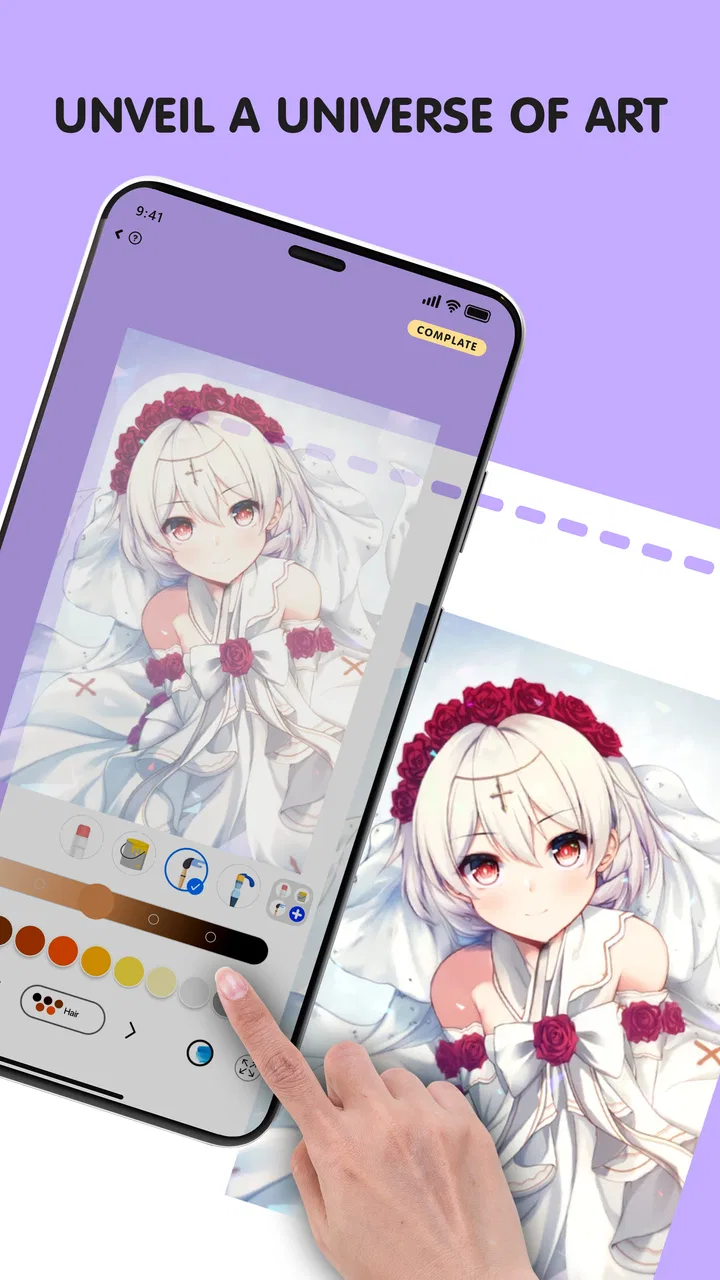
Color Dream - Paint & Coloring is the kind of art and design app I would suggest when you want a quiet creative break rather than a serious drawing studio. I found its appeal in the simple act of choosing an image, selecting colors, and gradually turning a plain outline into something personal. It is easy to understand at a glance, but the experience still rewards a little patience once you move beyond a quick test.
The app is free to install, carries an Everyone content rating, and comes from The Office Tool Mobie. Its store presence is already fairly large, with more than a million installs, although its average rating sits at 3.4 from roughly two and a half thousand ratings. That combination tells me to approach it with realistic expectations: plenty of people are trying it, but it is not a universally smooth experience for every user.
I spent time looking at it as a first-time user would, asking a practical question: can someone open it without knowing anything about digital coloring and reach a satisfying result quickly? My answer is yes, provided you treat it as a casual coloring tool instead of expecting the control and flexibility of a full illustration editor.
You May Also Like

 Blood Strike: 2.5 Anniversary
Blood Strike’s Loadouts Turn Every Drop Into a Tactical Gamble
A close look at Blood Strike’s custom loadouts: how fast access to signature weapons reshapes its battle royale rhythm, rewards preparation, and narrows the gap between fights.

 Pandora - Music & Podcasts
Pandora’s Music Is Easy to Start, but Harder to Recover
Pandora’s strength is its low-effort path from a seed to a station. Its weak spot is how much confidence it asks you to place in connection, setup, and quiet recovery.

 8 Ball Pool
 Is Built on Rivalries, Rematches, and Routine
A close look at the rivalries, rematches, shared routines, and unanswered safety questions that turn a quick pool match into a persistent mobile community.

 Samsung Music
’s Quiet Strength Is Playing What You Already Own
Its reach comes less from spectacle than from dependable access to a personal library. That simplicity is both the app’s strongest retention engine and its ceiling.

 AccuWeather: Weather Radar
AccuWeather Review: A Quick, Clear Forecast for Everyday Decisions
For everyday plans, the best forecast is the one you can understand quickly. AccuWeather makes rain timing, radar, and local conditions easy to act on, with a few trade-offs.

 Hill Climb Racing
Why Hill Climb Racing Still Turns Crashes Into One More Run
A tiny car, a bumpy hill and one more upgrade: Hill Climb Racing keeps resurfacing because its simple chaos makes every near-miss feel personal.
More From Our News Desk



What the first session feels like
The opening experience is built around reducing the distance between seeing an image and beginning to color it. That matters because many creative apps lose users before the first action by presenting too many tools, panels, and unexplained icons. Here, the basic idea is much more approachable. You are not required to understand layers, brushes, vector paths, or canvas settings before doing anything useful.
For a first visit, I recommend choosing an image that looks visually simple rather than immediately picking the most detailed design available. A picture with broad areas gives you a faster sense of progress and helps you learn how the coloring interaction behaves. The first meaningful success should come from completing a small section cleanly, not from trying to finish an intricate picture in one sitting.
That distinction is important. Coloring apps can look effortless in promotional images, but detailed artwork may demand more concentration than expected. If you begin with a complicated design while commuting or relaxing in a dim room, small controls can feel less comfortable and the activity may become fiddly. Starting modestly makes the app feel more rewarding.
The visual style also makes it suitable for short sessions. I can imagine using it while waiting for an appointment, winding down before bed, or taking a break from work. It does not ask you to produce an original drawing from an empty canvas, so the mental barrier is lower. You can focus on color choices and rhythm instead of worrying about whether you can draw.
At the same time, I would not confuse accessibility with unlimited creative freedom. This is primarily a guided coloring experience. If your goal is to sketch characters, edit photographs, design logos, or build a polished illustration from scratch, a dedicated drawing application will be a better fit. Color Dream - Paint & Coloring works best when the outline is already there and your role is to develop its mood.
Setting it up without overthinking
The app supports Android devices running version 7.0 or later, so it remains available to many older phones and tablets. On a compatible device, the sensible approach is simply to install it and begin with the free portion rather than making a purchase before you know whether the coloring feel suits you.
Its listed price is free, while in-app purchases range from $5.99 to $29.99 per item. I consider that an important part of the setup decision. A free starting point is useful, especially for someone testing digital coloring for the first time, but you should pay attention to any locked material or purchase prompts as you explore. Do not assume that every attractive image or option belongs to the no-cost experience.
The current version is 1.51, and the app was released on March 11, 2025. Those details are useful when troubleshooting: if the interface on your phone behaves differently after an update, checking that you are using the current version is a sensible first step. I also suggest giving yourself a few minutes to look around before deciding whether you like it. The first screen alone does not tell you how comfortable the coloring controls will feel during a longer session.
One practical habit helped me: I began with the phone held in the position that felt most natural, then avoided switching orientation halfway through a picture. Coloring depends on repeated small movements, so comfort matters more than it might in an app used only for reading. A stable grip and a clean screen make the experience noticeably less tiring.
If you are setting it up for a child, the Everyone rating makes the app broadly suitable from a content perspective, but I would still stay nearby during the first session. The purchase range means an adult should explain which buttons may lead beyond the free experience. That is not a criticism of the coloring concept; it is simply good practice whenever an app mixes free access with optional paid items.
Reaching the first satisfying result
My recommended first workflow is deliberately simple. Open a design, identify one large area, choose a color that contrasts with the surrounding outline, and complete that area before experimenting with anything else. This gives you a clear test of the core interaction: how accurately you can place color, how quickly the app responds, and whether the result looks clean enough to encourage you to continue.
After that first area, try a limited palette instead of changing colors constantly. Using two or three related shades can make an image look more deliberate, even when you are coloring casually. A warm group can create a cheerful result, while cooler tones can make the same outline feel calmer. The useful insight is that the app does not have to dictate the mood; your color choices do much of the creative work.
I also found that completing a picture in stages is more enjoyable than treating it as a single task. I might color the background first, pause, and return later for the smaller sections. That approach is especially helpful on a phone, where detailed work can become tiring. A short session that leaves one recognizable part finished feels more successful than a long session spent rushing through every area.
For a realistic everyday scenario, imagine having ten minutes before leaving home. Instead of opening a social feed, you can finish a few sections of an image and stop at a natural point. Later, you can return to the same design and continue. This makes the app a reasonable tool for small breaks, but less suitable if you want a single uninterrupted creative workspace lasting several hours.
Another useful approach is to use coloring as a way to test visual ideas. If you are preparing a handmade card, decorating a room, or choosing a mood for a personal project, a pre-drawn image can help you compare combinations quickly. It is not a replacement for a professional design tool, but it can function as a low-pressure color playground.
When you finish something you like, take a moment to judge it as a complete image rather than focusing only on tiny imperfections. Digital coloring can encourage endless corrections, especially when the design has many small spaces. I prefer deciding in advance that a picture is finished once the main areas are balanced. That keeps the activity relaxing instead of turning it into a precision test.
Where new users may hesitate
The first source of confusion is usually the difference between a free starting experience and optional paid content. A user may see an appealing design or a promising choice and wonder why it is unavailable. The practical answer is to explore the accessible material first and treat locked items as optional additions, not as proof that the app is unusable.
A second point is the difference between coloring and drawing. Someone arriving from a sketching app may expect to place lines anywhere, adjust brush size freely, or build an image layer by layer. That is not the reason to choose this app. Its value is in guiding your attention toward filling and styling existing artwork. If you want blank-canvas control, look toward a drawing or painting app instead.
Small details can also create friction. On a phone, narrow sections may require slower movements than broad areas. I recommend zooming or positioning the image carefully when working near edges, rather than trying to complete everything with quick taps. If your finger repeatedly lands beside the intended area, the problem may be the scale of the artwork rather than your choice of color.
There is also a personal preference issue around repetition. Guided coloring can be calming because it gives your hands a predictable task. However, users who need constant novelty may find the process less engaging after the initial attraction fades. I would test several designs before committing to any purchase, because the long-term value depends on whether you enjoy repeating the central coloring action.
The rating of 3.4 is worth keeping in mind without treating it as a final verdict. Ratings often combine different expectations: some people want a relaxing coloring book, while others expect a feature-rich art editor. My own view is that the app should be judged against the first category. It is more convincing as a casual creative companion than as a replacement for established professional tools.
Performance and comfort can vary with the device, especially when working on a small screen or with a very detailed image. I would avoid judging the entire app from one difficult picture. Try a simpler design, keep the device steady, and see whether the basic interaction feels natural. If it still feels cramped or imprecise, a larger tablet or a different app may be the better choice.
How it compares with familiar alternatives
Compared with a traditional coloring book, this app is more convenient because it removes the need for physical supplies and lets you change color choices without starting over. That makes experimentation easier. On the other hand, it cannot reproduce the tactile feel of paper, pencils, markers, or the visible texture of a handmade page. If the physical process is what relaxes you, a digital version may feel less satisfying.
Compared with a blank-canvas drawing app, it is much easier to begin. You do not need to know how to construct shapes or manage a composition. The trade-off is control: you work within the boundaries of prepared artwork. I would choose Color Dream for guided relaxation and quick color exploration, but choose a drawing app for original artwork, lettering, detailed retouching, or professional output.
Compared with a general photo editor, the experience is more focused and less technical. A photo editor may offer stronger adjustments, filters, and export tools, but it can also distract from the simple pleasure of coloring. This app makes sense when you want the activity itself, not a long chain of edits before the image feels complete.
Compared with a physical coloring book, another advantage is that mistakes do not carry the same permanence. You can experiment more freely and try unusual combinations. The downside is that the screen becomes part of the experience: battery use, finger placement, and display size all matter. For a quiet evening at home, either format can work; for travel, the digital option is easier to carry.
Who will enjoy it most
I think this app is strongest for beginners, casual users, and anyone who likes structured creativity. It can also suit people who feel intimidated by drawing because it offers a clear starting point. Parents may find it approachable for shared coloring time, while adults can use it as a low-effort way to step away from more demanding tasks.
It is less suitable for artists who need precision tools, editable layers, custom brushes, or complete control over the canvas. It may also disappoint users who want every part of the experience to be available without optional purchases. If either of those points describes you, a dedicated art app or a physical coloring book may offer better value.
For someone unsure about paying, my advice is straightforward: use the free experience long enough to finish at least one design and begin another. Notice whether you enjoy choosing colors, whether the controls feel comfortable, and whether the available material gives you enough variety. Only then should you decide whether optional purchases are worthwhile for your habits.
The developer, The Office Tool Mobie, positions the app in a broad art-and-design space, but the everyday use is much narrower and clearer: it is a guided coloring activity for mobile devices. That focus is a strength when you want simplicity. It becomes a limitation when you expect a complete creative suite.
My recommendation after using it
The best way to approach Color Dream - Paint & Coloring is as a gentle, pick-up-and-pause coloring companion. Start with a simple image, finish one large section, experiment with a small palette, and return later rather than forcing yourself to complete everything at once. That path gets you to the app’s main reward quickly and avoids the frustration of beginning with a design that is too demanding.
I like its low barrier to entry and the way it turns color selection into the main creative decision. The free entry point also makes it reasonable to test, while the Everyone rating keeps its intended audience broad. Its biggest weaknesses are the limits of guided coloring, the possibility of purchase friction, and the fact that a phone screen is not always ideal for tiny areas.
In the end, I would recommend it to a friend who wants a simple creative pause, especially someone who does not want to learn a complicated drawing interface. I would not recommend it to a person looking for professional illustration tools or complete freedom over every mark. If you understand that distinction before installing, the app has a fair chance of delivering exactly what it promises through its hands-on experience: a calm way to spend a few minutes making an image feel like your own.
FAQs for Color Dream - Paint & Coloring
01What features does Color Dream - Paint & Coloring offer?
Color Dream - Paint & Coloring provides a wide array of features including a vast library of images to color, a variety of tools like brushes and markers, and color palettes. It also offers daily updates with new images, a community section for sharing artwork, and offline capabilities for uninterrupted creativity.
02Is Color Dream - Paint & Coloring suitable for all ages?
Yes, Color Dream - Paint & Coloring is designed for users of all ages. It offers simple designs for younger users and more intricate patterns for adults. The app includes parental controls to ensure a safe environment for children, making it a family-friendly choice for creative expression.
03Does Color Dream - Paint & Coloring require an internet connection?
While Color Dream - Paint & Coloring can be used offline, an internet connection is necessary for downloading new images and accessing community features. Offline access allows you to color previously downloaded images without interruption, providing flexibility for those on the go.
04Are there in-app purchases in Color Dream - Paint & Coloring?
Yes, Color Dream - Paint & Coloring includes in-app purchases. Users can buy additional image packs, premium tools, and remove ads. While the app offers a free version, these purchases enhance the experience by unlocking exclusive content and features.
05How can I share my artwork from Color Dream - Paint & Coloring?
Sharing your creations is easy with Color Dream - Paint & Coloring. The app offers seamless integration with social media platforms and allows direct sharing via email or messaging apps. Users can also join the in-app community to showcase their artwork and gain inspiration from others.
Pros
- Wide variety of coloring pages.
- User-friendly interface.
- Offline mode available.
- Regularly updated content.
- Great stress reliever.
Cons
- Contains in-app purchases.
- Ads can be intrusive.
- Limited free content.
- Requires stable internet for updates.
- No custom color palettes.

Color Dream - Paint & Coloring
Gallery